
Required Fields
Learn how to make form fields required in GenZform to ensure users provide essential information.
Required fields are fields that must be filled out before the form can be submitted. Use them to ensure you get the essential information you need from every respondent.
When to Use Required Fields
Make fields required when:
- The information is essential (email for follow-up)
- You need it for the form to make sense
- Legal or compliance requirements apply
- The field is critical for your workflow
Don't make every field required—only those truly necessary. Too many required fields can hurt completion rates.
How to Make Fields Required
Ask the AI in the chat panel:
Example prompts:
- "Make the email field required"
- "Set name and email as required fields"
- "All fields should be required"
- "Make the phone field optional"
Manual Editor
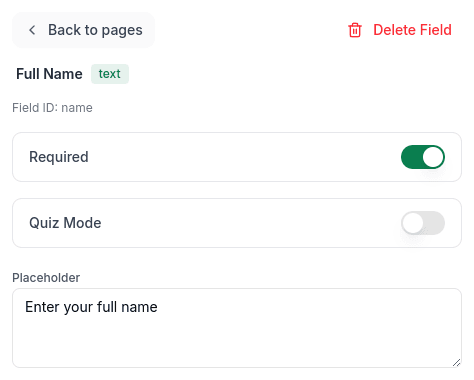
In Edit mode, select a field and toggle the Required switch in the properties panel:
Required Field Indicators
Required fields are typically marked with:
- An asterisk (*) next to the label
- Red highlighting if left empty
Best Practices
Do Require
- Contact information you need (usually email)
- Key form purpose fields (message, feedback, etc.)
- Legal acknowledgments (terms acceptance)
- Fields needed for calculations or logic
Don't Require
- Nice-to-have information (company size, referral source)
- Sensitive information users may not want to share
- Fields with obvious defaults
- Optional contact methods (phone if you have email)
Validation Messages
When users try to submit without filling required fields:
"Please fill in this field"Conditionally Required
Make fields required only in certain situations:
"Make 'Company Name' required only if 'Account Type' is 'Business'"Frequently Asked Questions
How are required fields indicated to users?
Required fields typically show an asterisk (*) next to their label.
Can I make a field conditionally required?
Yes! Use conditional logic: "Require company name only if user type is Business."
What happens if users skip required fields?
The form won't submit and an error message appears next to the empty required field.