
Placeholder Text
Learn how to add placeholder text to GenZform fields to guide users on what to enter.
Placeholder text is hint text that appears inside form fields before users start typing. It provides guidance on what to enter and disappears when the user clicks on the field.
When to Use Placeholders
Placeholders are helpful for:
- Showing expected format (e.g., "[email protected]")
- Providing examples (e.g., "John Doe")
- Brief instructions (e.g., "Enter your 10-digit phone number")
- Format hints (e.g., "MM/DD/YYYY")
Don't use placeholders as the only label—they disappear when typing and can confuse users. Always include a visible label above the field.
How to Add Placeholder Text
Ask the AI in the chat panel:
Example prompts:
- "Add placeholder '[email protected]' to the email field"
- "Set placeholder text for name to 'John Doe'"
- "Add a placeholder showing the expected format"
- "Include example text in the message field"
Manual Editor
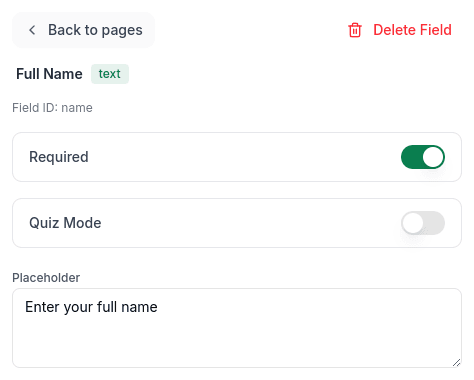
In Edit mode, select a field and enter text in the Placeholder field in the properties panel:
Best Practices
Do
- Show format examples: "[email protected]"
- Use brief hints: "e.g., Marketing Manager"
- Match the expected input type
Don't
- Replace labels with placeholders
- Write long instructions as placeholders
- Use placeholders for required information
Placeholder Examples
| Field | Placeholder |
|---|---|
| [email protected] | |
| Phone | (555) 123-4567 |
| Name | John Doe |
| Date | MM/DD/YYYY |
| URL | https://yourwebsite.com |
| Message | Type your message here... |
Placeholder vs. Default Value
| Aspect | Placeholder | Default Value |
|---|---|---|
| Visibility | Disappears on focus | Stays until changed |
| Submission | Not submitted | Submitted if unchanged |
| Purpose | Hint/example | Pre-filled answer |
| Style | Usually lighter text | Same as user input |
Frequently Asked Questions
Do placeholders get submitted with the form?
No. Placeholders are just visual hints—they disappear when users type and aren't included in submission data.
Can I style placeholder text?
Placeholder styling follows your form's theme. The text is typically shown in a lighter gray color.
Should I use placeholders instead of labels?
No! Placeholders disappear when typing, so users may forget what the field is for. Always use visible labels above fields.