
Quiz Answers
Learn how to set correct answers for quiz questions in GenZform for automatic scoring.
Setting correct answers is essential for quiz scoring. GenZform supports various answer types and automatically checks responses against your defined correct answers.
How Answers Work
When you create a quiz, each question can have:
- Correct answer(s) - The right response(s)
- Point value - How many points the question is worth
- Partial credit - Optional credit for partially correct answers
Setting Correct Answers
Ask the AI in the chat panel:
Example prompts:
- "Set the correct answer for question 1 to 'Paris'"
- "Mark option B as correct for all multiple choice questions"
- "Set correct answers: Q1=A, Q2=C, Q3=B"
- "Allow multiple correct answers: 'London', 'london'"
Manual Editor
In Edit mode, select a question field to configure its quiz settings in the properties panel:
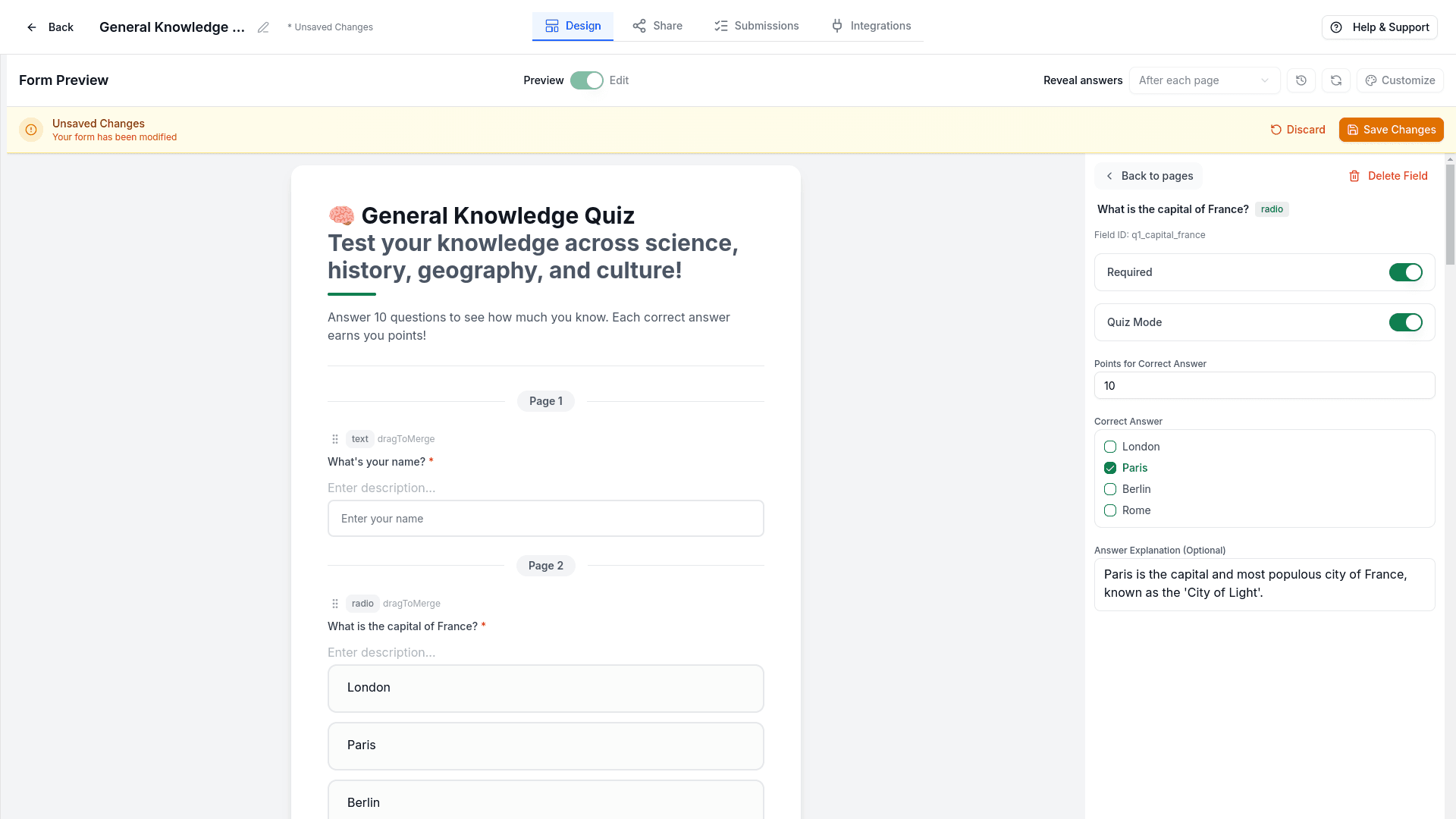
- Quiz Mode - Enable to make this a scored question
- Points - Set the point value for correct answers
- Correct Answer - Select the correct option from the dropdown
- Answer Explanation - Add feedback text shown after answering
Answer Types
Single Correct Answer
Most common for multiple choice:
"What is the capital of France?"
Correct: Paris
Multiple Correct Answers
For "select all that apply" questions:
"Which are primary colors?" (select all)
Correct: Red, Blue, Yellow
Text Answer Matching
For fill-in-the-blank:
"The largest planet is ____"
Correct: "Jupiter" (case-sensitive)
Range Answers
For numeric questions:
"What year did WWII end?"
Correct: 1945 (accepts 1945 exactly)
Answer Validation Options
Text answers are case-sensitive. "Paris" and "paris" are treated as different answers. The system does not automatically recognize equivalent terms like "USA" and "America" as the same answer.
Accepting Multiple Valid Answers
For text-based questions where more than one answer should be accepted, enter all valid answers separated by commas in the correct answer field.
Correct Answer: USA, United States, America, USEach comma-separated value is treated as a separate valid answer. A response matching any one of the listed values will be marked correct.
Matching is case-sensitive — if you want to accept both "Paris" and
"paris", you must list both:
Paris, paris, PARIS
Numeric Answers
For numeric questions, enter the exact correct value. The system checks for an exact match.
Correct Answer: 1945Point Values
Equal Points
"Each question is worth 1 point"Weighted Points
"Make difficult questions worth 2 points, easy ones 1 point"Partial Credit
"Give partial credit for partially correct answers"Frequently Asked Questions
Can I have multiple correct answers?
Yes! For "select all that apply" questions, you can mark multiple options as correct.
Are text answers case-sensitive?
Yes, text matching is case-sensitive ("Paris" ≠ "paris"). To accept
different capitalizations, list each variation separated by commas in the
correct answer field (e.g., Paris, paris, PARIS).
Can I accept multiple spellings or synonyms?
Yes! Enter all accepted answers separated by commas in the correct answer
field. For example: colour, color or USA, United States, America. The
system does not automatically match synonyms, so you must list each
variation explicitly.