
Account Settings
Learn how to manage your GenZform account settings, view subscription details, and track your AI usage.
Your account settings page lets you view your profile information, manage your subscription, and monitor your AI chat usage.
Accessing Account Settings
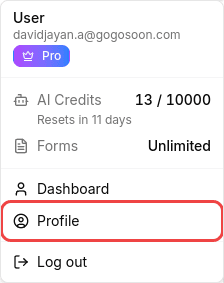
Click your profile
Click on your profile icon or name in the top right corner of the header.

Select Profile
In the dropdown menu, click Profile to open your account settings page.
Profile Overview
Your profile page is organized into four sections:
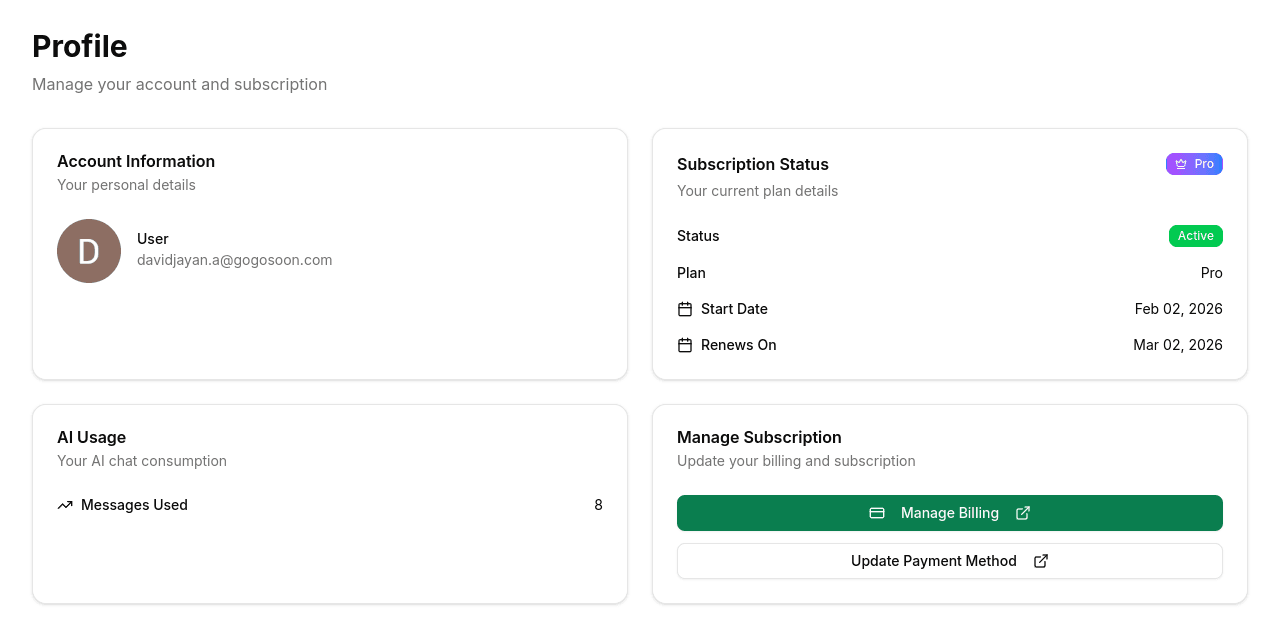
Account Information
Displays your personal details:
- Name - Your display name (from your sign-in method)
- Email - Your account email address
- Avatar - Your profile picture (from Google/social login)
Subscription Status
Shows your current plan details at a glance:
- Status - Whether your subscription is Active or inactive
- Plan - Your current plan (Free or Pro)
- Start Date - When your current billing period started
- Renews On - When your subscription will next renew
Free plan users will see a Free Forever badge, while Pro users see a Pro badge.
AI Usage
Tracks your AI chat consumption:
- Messages Used - Total number of AI messages you've sent
Manage Subscription
Pro plan subscribers have access to:
- Manage Billing - Opens the Lemon Squeezy customer portal to view invoices, payment history, and billing information
- Update Payment Method - Change your credit card on file
- Cancel subscription - A small link at the bottom to cancel your subscription. Your access continues until the end of your billing period.
Free plan users will see an Upgrade to Pro button instead, which takes you to the pricing page.
Account Security
GenZform supports secure authentication through:
- Google Sign-In - OAuth authentication
- Magic Links - Passwordless email login
Your account is protected by your chosen sign-in method.
Frequently Asked Questions
How do I change my email address?
Currently, your email is linked to your sign-in method. To use a different email, sign out and create a new account with the desired email address.
How do I reset my login?
GenZform uses passwordless authentication. You can sign in with Google or request a new magic link from the sign-in page.
What happens to my forms if I cancel Pro?
Your forms remain accessible. You'll keep all existing forms and submissions, but Pro features will be limited based on the free plan quota.
How do I delete my account?
To delete your account, please contact our support team. Account deletion removes all forms and data permanently.