
Cancel Subscription
Learn how to cancel your GenZform subscription and what happens to your data.
If you need to cancel your subscription, you can do it directly from your profile page.
How to Cancel
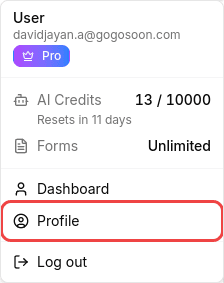
Click your profile icon
Click on your profile icon in the top-right corner of the page to open the profile menu.

Go to Profile
Select Profile from the dropdown menu. This opens your account page where you can see your subscription status and billing details.
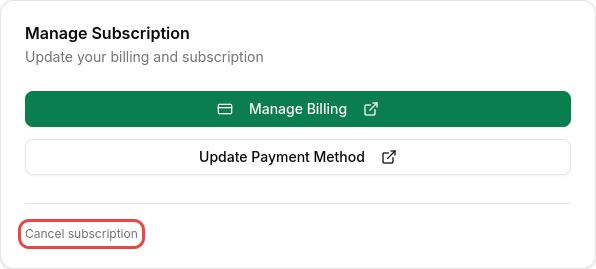
Find the cancel option
Scroll to the Manage Subscription card. At the bottom, below the billing buttons, you'll see a small Cancel subscription link.
Confirm cancellation
A confirmation dialog will appear showing when your access ends. Click Yes, cancel subscription to proceed, or Keep my plan to stay on your current plan.
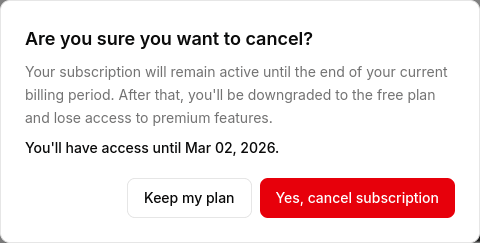
Your subscription stays active until the end of your current billing period. You won't lose access immediately.
What Happens After Cancellation
- Forms are preserved — all your forms remain exactly as they are
- Responses are kept — all submission data is retained
- Access continues — paid features work until your billing period ends
- Then you downgrade — after the period ends, you move to the Free plan
What You Keep on Free Plan
After downgrading, you still get:
- Up to 100 forms
- Unlimited responses (never pay per submission)
- All form types
- Email notifications
- CSV export
Reactivating Later
Changed your mind? You can resubscribe anytime from the Pricing page and your paid features will reactivate immediately.
Frequently Asked Questions
Will I lose my forms?
No! All forms and responses are preserved forever, even on the Free plan. However, if you have more forms than the Free plan allows, you won't be able to create new ones until you're under the limit.
What happens to my custom branding?
Custom themes and branding removal are paid features. After cancellation, GenZform branding will reappear on your forms.
Can I get a refund?
Please see our Refund Policy for details on eligibility.
Can I export my data before canceling?
Yes! You can export all your form responses to CSV before or after canceling. CSV export is available on all plans.