
Embed on Any Website
Learn how to embed GenZform forms on any HTML website using iframe embeds, popups, or full-page layouts.
GenZform provides three ways to embed forms on your website: Standard (inline iframe), Popup (button-triggered modal), and Full Page (takes entire viewport). Each option includes the GenZform embed script that handles responsive sizing and interactions.
Getting Your Embed Code
Open your form in the editor
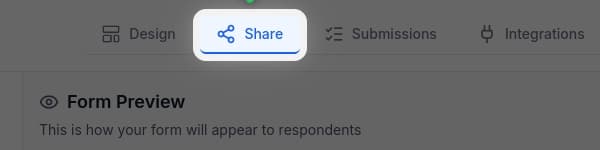
Navigate to your form in the GenZform dashboard and click the Share tab.
Select your embed style
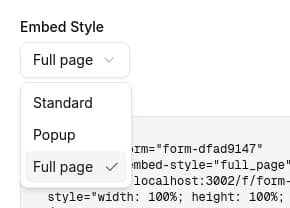
Choose from three embed styles:
- Standard - Inline iframe that fits within your page content
- Popup - Button that opens the form in a modal overlay
- Full Page - Form takes up the entire viewport
Copy the embed code
Click Copy to copy both the embed element and the required script tag. Paste this code into your website's HTML where you want the form to appear.
Embed Styles
Standard Embed
The standard embed displays your form inline within your page content using an iframe. The height automatically adjusts based on the form content.
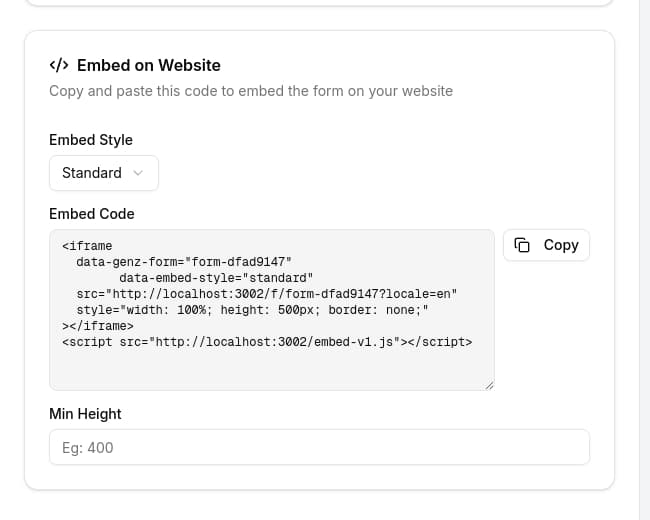
<iframe
  data-genz-form="YOUR_FORM_ID"
  data-embed-style="standard"
  src="https://genzform.com/f/YOUR_FORM_ID"
  style="width: 100%; height: 500px; border: none;"
></iframe>
<script src="https://genzform.com/embed-v1.js"></script>
Options:
- Min Height - Set a minimum height in pixels to prevent the form from being too short
Popup Embed
The popup embed creates a button that opens your form in a modal overlay. This is ideal for lead capture or contact forms that shouldn't take up page space.
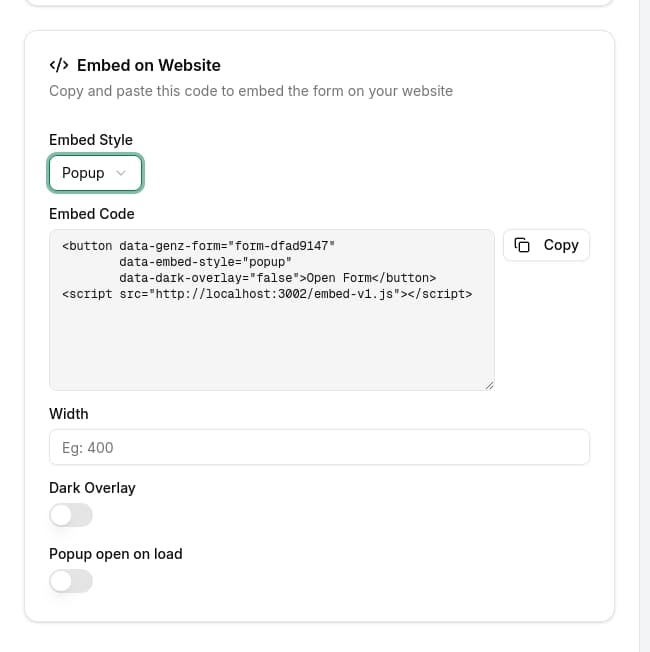
<button
  data-genz-form="YOUR_FORM_ID"
  data-embed-style="popup"
  data-dark-overlay="true"
>Open Form</button>
<script src="https://genzform.com/embed-v1.js"></script>
Options:
- Width - Set the popup width in pixels (default: 450px)
- Dark Overlay - Enable/disable the dark background behind the popup
- Popup open on load - Automatically open the popup when the page loads
- Popup Delay - Delay in milliseconds before auto-opening (requires "open on load" enabled)
Full Page Embed
The full page embed makes your form take up the entire viewport. Use this when you want the form to be the primary focus, such as on a dedicated landing page.
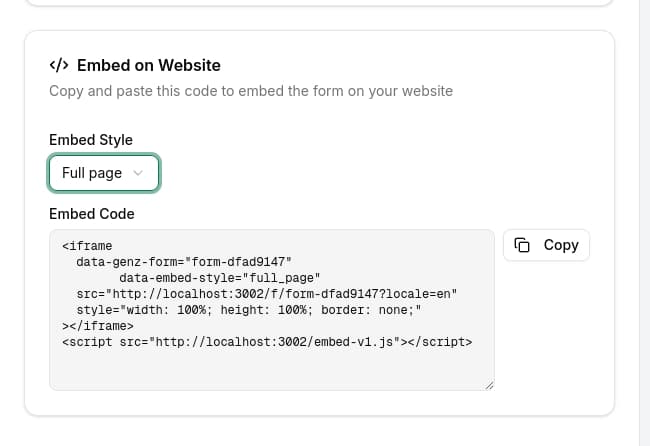
<iframe
  data-genz-form="YOUR_FORM_ID"
  data-embed-style="full_page"
  src="https://genzform.com/f/YOUR_FORM_ID"
  style="width: 100%; height: 100%; border: none;"
></iframe>
<script src="https://genzform.com/embed-v1.js"></script>
For full page embeds, ensure the parent container has height: 100vh or similar to allow the form to fill the viewport.
Data Attributes Reference
The GenZform embed script reads these data attributes to configure your embed:
| Attribute | Description | Values |
|---|---|---|
data-genz-form | Your form's unique identifier (required) | Form ID from Share tab |
data-embed-style | The embed style to use | standard, popup, full_page |
data-min-height | Minimum height for standard embeds | Number in pixels (e.g., 400) |
data-width | Width for popup embeds | Number in pixels (e.g., 500) |
data-dark-overlay | Show dark background for popup | true or false |
data-popup-open-on-load | Auto-open popup on page load | true or false |
data-popup-delay | Delay before auto-opening popup | Milliseconds (e.g., 3000) |
Styling Tips
Centering the Form
<div style="display: flex; justify-content: center;">
  <iframe
    data-genz-form="YOUR_FORM_ID"
    data-embed-style="standard"
    src="https://genzform.com/f/YOUR_FORM_ID"
    style="width: 100%; max-width: 600px; height: 500px; border: none;"
  ></iframe>
</div>
<script src="https://genzform.com/embed-v1.js"></script>
Custom Popup Button
Style the popup trigger button to match your website's design:
<button
  data-genz-form="YOUR_FORM_ID"
  data-embed-style="popup"
  data-dark-overlay="true"
  style="background: #22c55e; color: white; padding: 12px 24px; border: none; border-radius: 8px; cursor: pointer; font-size: 16px;"
>Get a Quote</button>
<script src="https://genzform.com/embed-v1.js"></script>
Frequently Asked Questions
Will the form work on any website?
Yes. The iframe embed works on any website that supports HTML, including static sites, CMSs, and web applications.
Does the form height adjust automatically?
For standard embeds, the GenZform script automatically adjusts the iframe height based on the form content. For full page embeds, ensure the parent container has an explicit height.
Can I remove the GenZform branding?
Yes. Branding removal is available on Pro plans. Go to Customize in the form editor to toggle branding off.
Can I embed the same form multiple times on one page?
Yes. Each embed operates independently. Just make sure to include the script tag only once.